Skip to content
View in the app

A better way to browse. Learn more.

Gear Crushers

A full-screen app on your home screen with push notifications, badges and more.

To install this app on iOS and iPadOS
  1. Tap the Share icon in Safari
  2. Scroll the menu and tap Add to Home Screen.
  3. Tap Add in the top-right corner.
To install this app on Android
  1. Tap the 3-dot menu (⋮) in the top-right corner of the browser.
  2. Tap Add to Home screen or Install app.
  3. Confirm by tapping Install.

Detroit Winterfest

(1 review)

REQUIREMENTS

  • Flags Required

  • No ATVs or Motorcycles

SIGNUP

https://4festevents.com/detroit-winterfest-detroit-mi-off-roading-event/register-2/

AGENDA

8:00 AM

Gates Open For Parking – Shields Rd. Entrance

Flag Sales & Installation Will Begin

9:00 AM

Gates open at Holly Oaks ORV Park - Entrance on Shields Rd.

Vendor Village opens

Vendor Displays Open

D&W Street Food
Hot Chocolate provided by Dana

10:00 AM

Off-Road 101 course by Wicked Jeeps

11:00 AM

Lunch Service Begins

12:00 PM

Guided Park Tour - Meet at 4Fest Events Merchandise Trailer

1:00 PM

Off-Road 101 course by Wicked Jeeps

2:00 PM

Lunch Service Ends

5:00 PM

NightFest by TYRI Lighting

7 :30 PM

Trail Sweeping Begins

8:00 PM

Gates Locked

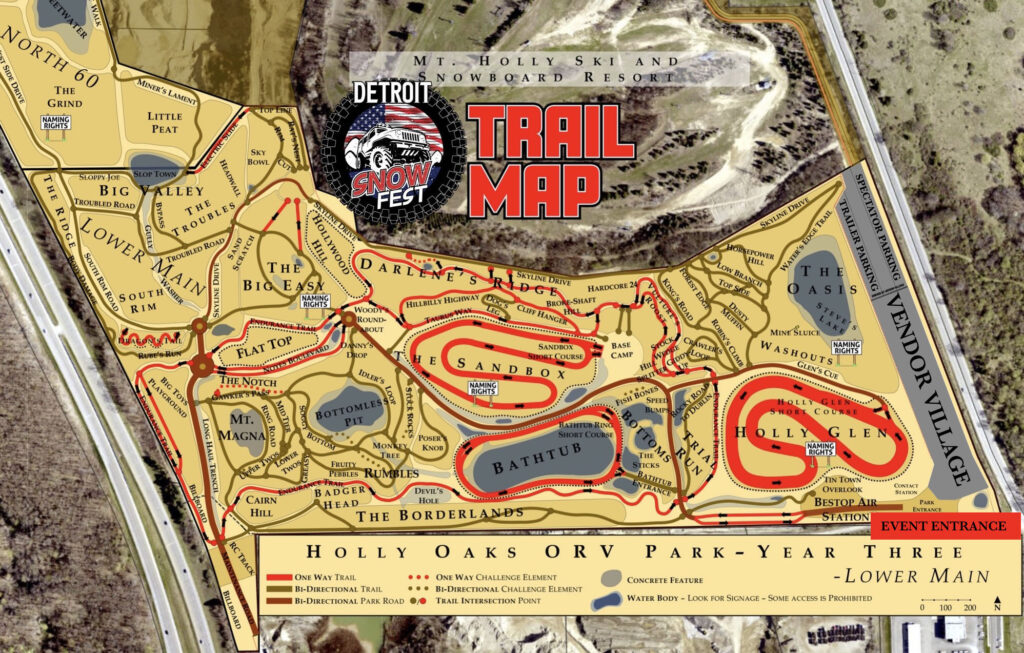
Trail Map

Download Map

SnowFest Map


User Feedback

Create an account or sign in to leave a review


Nicely done event and especially for the price of $25 and we also paid an additional $25 for the 101 course that Wicked Jeeps offered and it was fun. Really it was like a guided tour of the park (wish they shared radio frequency since it would of added to the experience). Will do the Detroit WinterFest again next year for sure

Important Information

By using this site, you agree to our Terms of Use.

Account

Navigation

Search

Search

Configure browser push notifications

Chrome (Android)
  1. Tap the lock icon next to the address bar.
  2. Tap Permissions → Notifications.
  3. Adjust your preference.
Chrome (Desktop)
  1. Click the padlock icon in the address bar.
  2. Select Site settings.
  3. Find Notifications and adjust your preference.