Skip to content
View in the app

A better way to browse. Learn more.

Gear Crushers

A full-screen app on your home screen with push notifications, badges and more.

To install this app on iOS and iPadOS
  1. Tap the Share icon in Safari
  2. Scroll the menu and tap Add to Home Screen.
  3. Tap Add in the top-right corner.
To install this app on Android
  1. Tap the 3-dot menu (⋮) in the top-right corner of the browser.
  2. Tap Add to Home screen or Install app.
  3. Confirm by tapping Install.

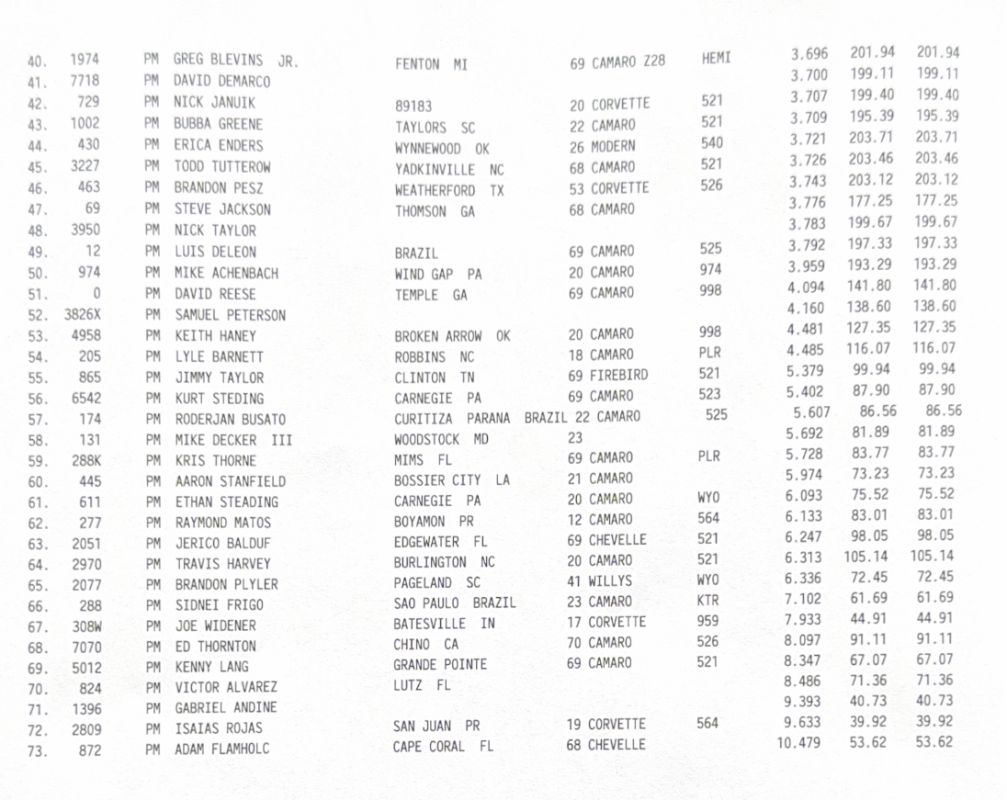
Thursday Qualifying Results – 2025 Snowbird Outlaw Nationals Pro Mod and Pro 10.5

(0 reviews)

The 2025 Snowbird Outlaw Nationals presented by Motion Raceworks at Bradenton Motorsports Park is officially underway with Thursday qualifying. Due to rain in the Sunday forecast, race officials moved up the event schedule. The plan is now to complete qualifying on Thursday and Friday before going into eliminations Saturday and crowning winners on Saturday night.

The historic event serves as the opening race of the second annual Drag Illustrated Winter Series presented by J&A Service, a three-race Pro Mod series paying out more than $275,000 to race winners and the series champion. The event also includes Pro 10.5, True 10.5 N/T, Lil Gangstas, Limited Drag Radial, Ultra Street and more.

Tune in to the official event livestream on FloRacing here: https://flosports.link/46edcdu

Find additional class qualifying results on the Bradenton Motorsports Park Facebook page here.

pro mod q1
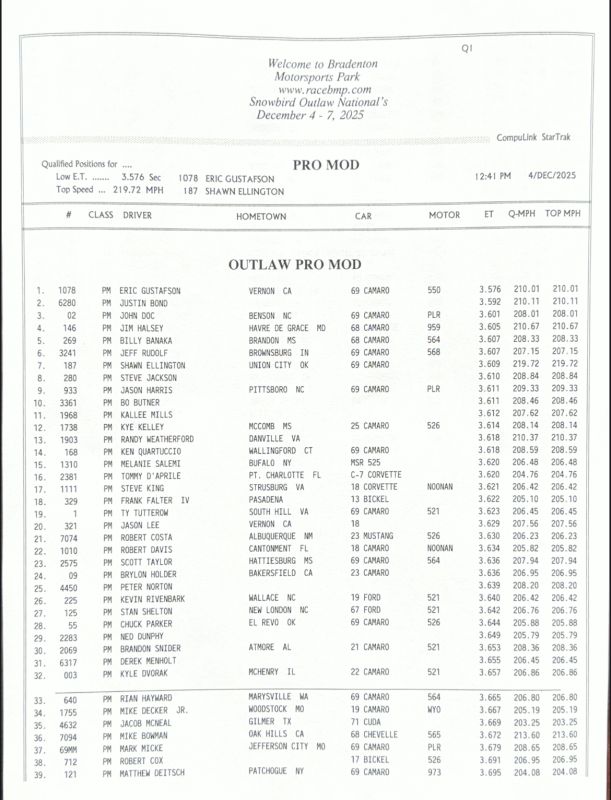
PM-Q1-1-611x800.jpg PM-Q1-2-1007x800.jpg

This story was originally published on December 4, 2025. Drag Illustrated

The post Thursday Qualifying Results – 2025 Snowbird Outlaw Nationals Pro Mod and Pro 10.5 first appeared on Drag Illustrated.

View the full article

User Feedback

There are no reviews to display.

Street Clubs

Important Information

By using this site, you agree to our Terms of Use.

Account

Navigation

Search

Search

Configure browser push notifications

Chrome (Android)
  1. Tap the lock icon next to the address bar.
  2. Tap Permissions → Notifications.
  3. Adjust your preference.
Chrome (Desktop)
  1. Click the padlock icon in the address bar.
  2. Select Site settings.
  3. Find Notifications and adjust your preference.