



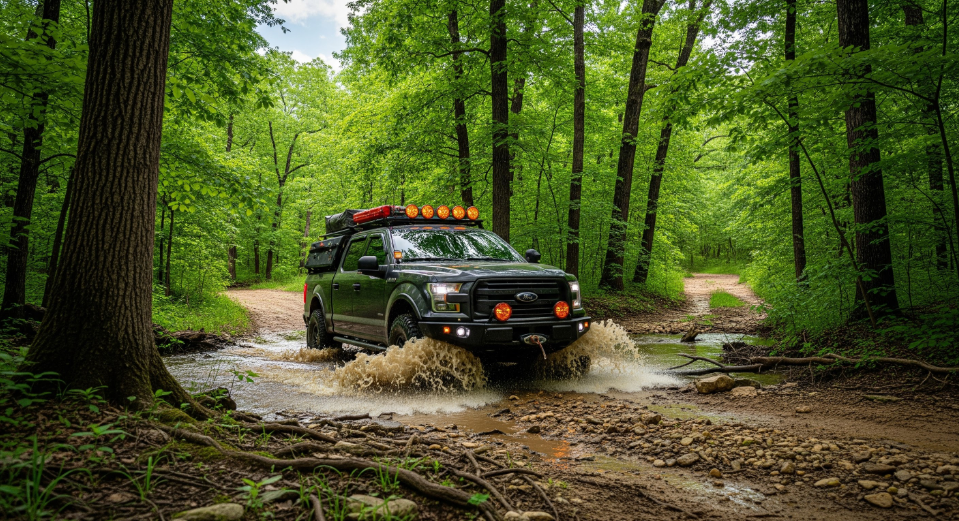
Ford trucks have become some of the most popular platforms for overlanding in Missouri. Whether it's weekend trips through Mark Twain National Forest or long-distance travel across the Midwest, the F-150, F-250, and F-350 offer excellent payload, comfort, and off-road capability. The right upgrades make these trucks even more capable for self-supported travel.
This guide outlines the essential overlanding upgrades for Ford truck owners in St. Louis, from racks and storage to armor, lighting, power management, and recovery gear.
For more Ford upgrade categories,
check out our upgrades guide.
1. Why Ford Trucks Excel at Overlanding
Ford trucks provide a strong foundation for overlanding due to:
- Excellent payload ratings
- Strong suspension platforms
- Large bed space for gear
- Reliable drivetrain options
- Factory 4x4 systems suited for mixed terrain
But even the most capable trucks benefit from upgrades.
2. Bed Rack and Gear Storage Systems
Keeping gear organized and accessible is critical.
Recommended Storage Upgrades
- Modular bed rack systems
- Lockable cargo boxes
- Sliding bed trays
-
Drawer systems for tools and recovery gear
- Rooftop tent–compatible racks
Many truck owners combine storage with compatible bed covers.
Click Here for more information.
3. Suspension Upgrades for Overlanding
Ford trucks benefit from suspension tuned for added weight.
Key Overland Suspension Components
- Load-rated rear springs
- Heavy-duty shocks
- Air bags for towing and load management
- Coilovers for improved front-end control
For details on lift options, check our guide.
4. Lighting Upgrades for Night Trails
Visibility is essential for night driving and campsite setup.
Best Overlanding Lighting Upgrades
- Ditch lights for cornering
- Hood-mounted scene lights
-
Rock lights for slow-speed terrain
- Rear camp lights
- Fog lights with wide beam patterns
5. Power Management for Accessories
Modern overlanding setups require power for refrigerators, lighting, radios, and tools.
Recommended Electrical Upgrades
- Portable battery systems
- On-board dual battery setups
- Solar charging panels
- Power distribution modules
- Fuse-protected accessory wiring
High-quality wiring reduces electrical risk during long trips.
6. Recovery Gear and Safety Essentials
Being self-sufficient is part of the overlanding mindset.
Essential Recovery Tools
- Soft shackles
-
Kinetic recovery rope
- Traction boards
- Tire repair kit
- On-board air compressor
- Recovery-rated tow points
These basics ensure safe travel in remote areas.
Conclusion
Ford F-150 and Super Duty trucks offer a rock-solid base for overlanding across Missouri and beyond. With the right upgrades for storage, suspension, lighting, and power, St. Louis owners can build reliable adventure-ready rigs suited for trails and long-distance exploration.
For additional Ford upgrade information,
see our guide.


Recommended Comments
Create an account or sign in to comment